Your first governed journey
Discover and use an exact released Asset with authorized Knowledge, provenance, progress, citations, and feedback.
This journey begins after an organization administrator has given you access and at least one Asset has been released. It uses the product as an authorized consumer; it does not require repository access, local bootstrap, or deployment commands.
You will discover an authorized release, verify its provenance, use the action defined for its Asset type, and finish with evidence and feedback. The numbered sections below are the journey; no separate setup path is required.
1. Open the Assets catalog
Open Assets from the product navigation. Available to me is the default scope and lists only released, non-withdrawn Assets that your current identity may use. Search by task, role, or outcome, filter by Asset type, and choose the exact item you need. Cards show the human owner, sharing state, current exact version, and updated time; Skills also expose your personal Enabled choice.
Created by me is the owner's workspace and can include private working copies that have not been released. Return to Available to me when your goal is to consume an Asset rather than author one.
An Asset that does not appear may be unavailable, withdrawn, or outside your current permission scope. The catalog does not reveal denied Asset names or metadata.
2. Verify the exact release
Open the Asset and confirm:
- the type matches the task you intend to perform;
- the selected version is the release you expect;
- its availability permits new use rather than being withdrawn; a
Deprecatedbadge can remain on compatible historical releases; - the summary, audience, prerequisites, and expected outcome fit your work;
- Version and provenance identifies the release coordinate, date, and digest.
The release is immutable. Choosing a version does not switch to a mutable draft, and a newer release never rewrites an existing Capability Pack pin.
3. Use the Asset
The available action depends on its type.
Prompt Template
Provide the validated variables, optionally request authorized Knowledge grounding, inspect the prepared prompt, and explicitly confirm any model-provider run.
Work Instruction
Follow the ordered steps, expected results, checks, and escalation guidance, then acknowledge the exact release.
Capability Pack
Review the outcome and prerequisites, open the Pack, use its accessible pinned components in order, and record your progress.
Skill
Inspect the compatibility, package manifest, file digests, and exact install command before installing through the authenticated CLI.
State-changing actions and external model calls require explicit confirmation. The Assistant cannot approve, publish, withdraw, change permissions, or execute arbitrary tools on your behalf.
During a grounded answer, the Assistant may discover a Skill you are currently allowed to use, load the instructions from its exact release, and read a bounded supporting text file when needed. These reads do not install or execute the Skill, and package metadata cannot grant the Assistant additional tools or permissions. If no authorized Knowledge evidence is available, the Assistant does not start this Skill flow.
4. Complete a Capability Pack
A Capability Pack joins exact Knowledge versions, Prompt templates, Work instructions, or Skills into one ordered journey. Starting it creates a private assignment for your actor; it does not modify the Pack release.
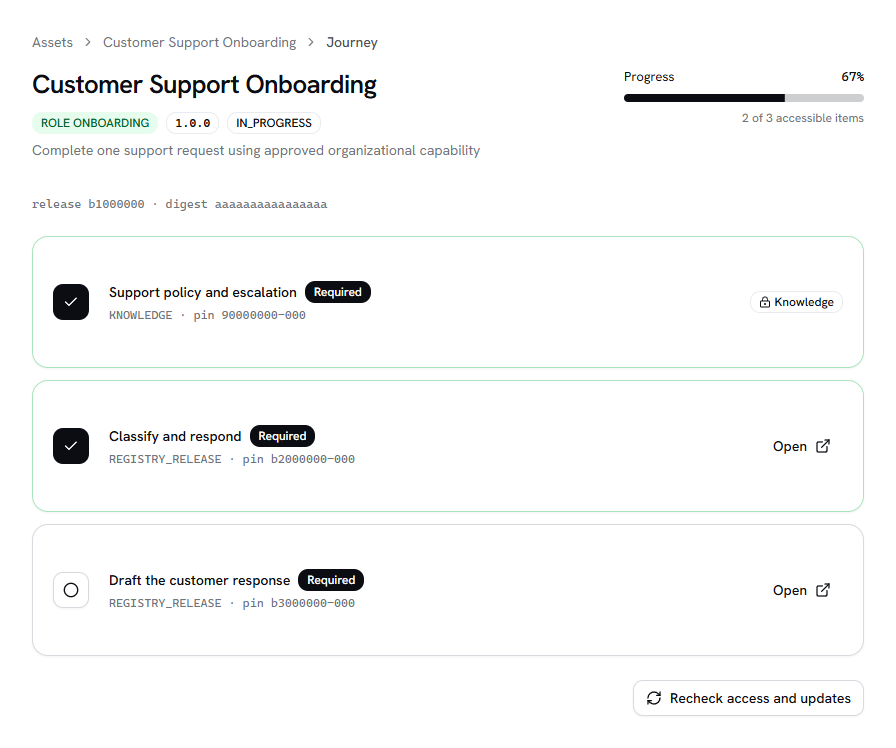
Open each reusable Asset component from the journey and mark an item complete only after performing its required work. Knowledge components remain identified by their pinned version. If a component is denied, the Pack reports an access gap without exposing the hidden title, type, or count; ask the Pack owner to review your access.
5. Verify evidence and send feedback
When a Prompt run or Assistant answer uses organizational Knowledge, inspect its citations before relying on the result. Opening a citation asks the API to recheck your current permission and the original evidence integrity. A result you could access earlier may correctly become unavailable after a revocation.
Use the Asset's feedback control to report whether the release was useful, incorrect, or incomplete. Feedback is stored against the exact release and sent to its accountable owner; it does not mutate the release you used.
Continue
- Follow the task-focused governed Assets guide.
- Understand secure retrieval and GraphRAG.
- Look up the Assistant API reference.
Last updated on